OpenSSH: Instalasi Dan Konfigurasi Dasar
I’m a passionate network system and security enthusiast with a knack for solving complex technical challenges. With extensive experience in troubleshooting and optimizing network infrastructures, I’m dedicated to ensuring systems run smoothly and securely. Through this blog, I share insights, tips, and innovative solutions to help you tackle and overcome network and security issues. Feel free to connect with me on LinkedIn or reach out via email at asrul@solusiber.com.
Pada artikel kali ini saya akan melakukan instalasi dan konfigurasi dasar openssh server di debian 12.
Topologi
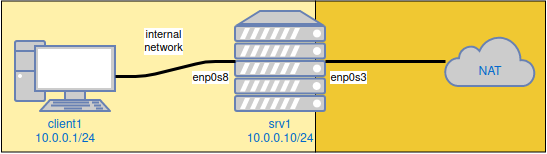
Instalasi
root@srv1:~# apt install openssh-server
Konfigurasi Dasar
Edit file /etc/ssh/sshd_config. Secara default ssh menggunakan port 22 kita akan rubah menggunakan port 2024 dan kita akan menizinkan user root untuk login via ssh.
#Port 22             #baris nomor 14
Hapus tanda pagar dan rubah seperti dibawah ini.
Port 2024


#PermitRootLogin prohibit-password        #baris nomor 33
Hapus tanda pagar dan rubah seperti dibawah ini.
PermitRootLogin yes
Setelah itu restart service sshd.
root@srv1:~# systemctl restart sshd
Uji Coba
Silahkan remote srv1 menggunakan client1 via ssh.
root@srv1:~# ssh root@10.0.0.10 -p 2024